
how_to_playbook
One Line in Claude Code: The Model Context Protocol Implementation That Ran Our Whole Marketing Loop
August 27, 2026 · 9 min read · Scout7
A Model Context Protocol implementation guide: connect Claude, Cursor or ChatGPT to a live marketing workspace and run an 18-piece day from one plan.
Introduction
Model Context Protocol implementation for marketing is the fastest way to make an AI agent useful: connect the agent to approved website and workspace data, confirm the exposed tools, and run a live scan command. In plain terms, MCP is the layer that lets your agent stop guessing and start reading your real business context.
Key takeaways:
- MCP connects AI agents to live marketing data
- One line can expose approved website tools in-session
- The first win is a site scan and gap summary
- Context beats prompts when everyone already has AI
You probably already have an AI agent open all day.
The harder truth is that it still cannot see your site structure, content inventory, editorial calendar, or approved performance data, so it keeps producing generic work when you need an operator.
That gap matters now because AI access is no longer rare.
This playbook shows how to connect Claude, Cursor, or ChatGPT through MCP so the agent can pull live website data for content creation before you finish reading.
Why your AI agent needs context, not just prompts
 If every team has AI, then generic output becomes the default failure mode.
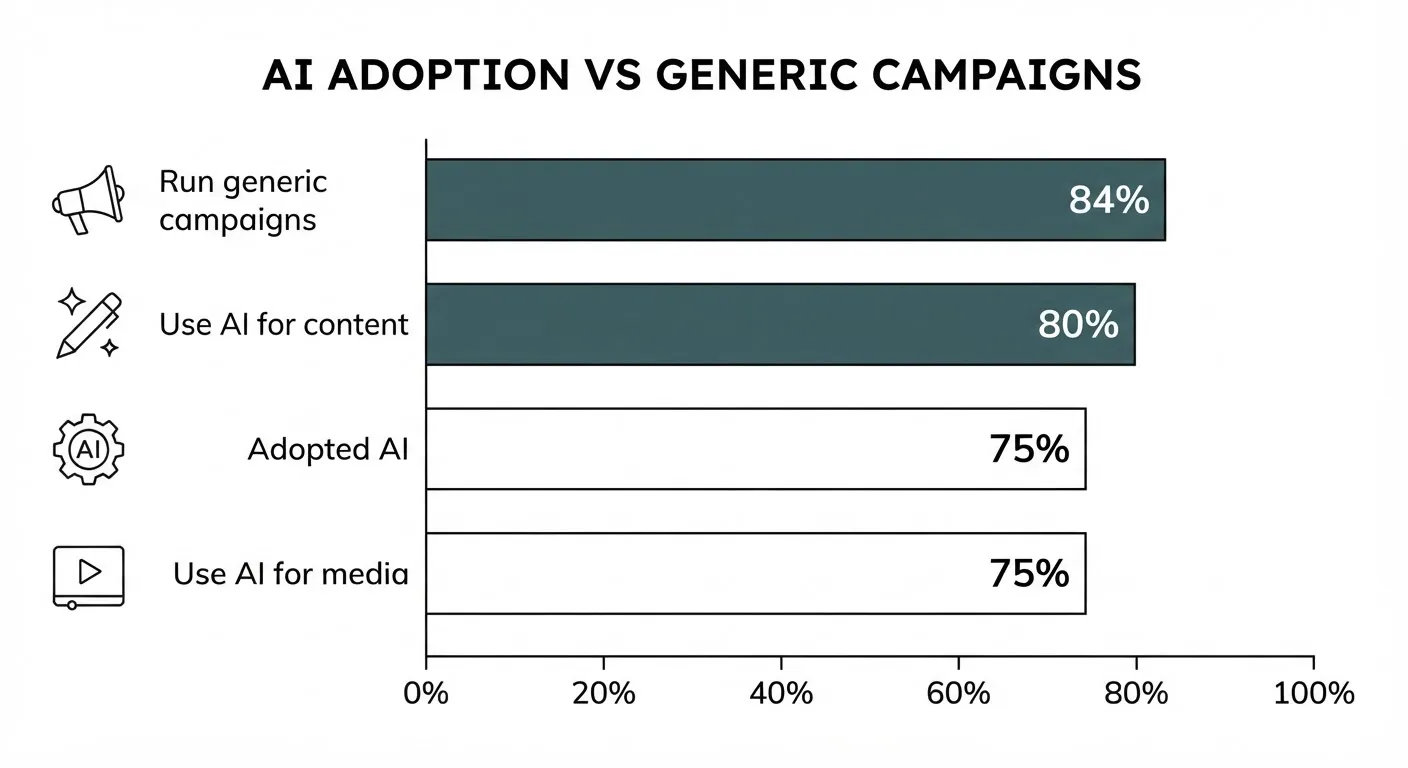
According to Salesforce’s State of Marketing 2026, three in four marketers (75%) have adopted AI, yet more than eight in ten (84%) still run generic campaigns. HubSpot’s 2026 State of Marketing report adds that four in five marketers (80%) use AI for content creation, which means access is table stakes.
So the real bottleneck is not prompting skill.
It is context-plumbing: the work of giving an AI Agent approved access to the brand workspace it needs to reason, draft, and act.
We used that same loop for this article: the agent planned, drafted, and prepared it over MCP, with human approval before generation and before publication, plus clear AI disclosure.
Based on what we saw when using our own agent workflow to plan, draft, and publish this article, the setup step that changes output quality is the connection to live context, not another prompt rewrite.
And that brings us to the practical question founders actually ask next.
Step 1: Prepare your data for MCP access
 Before you connect anything, make the workspace readable, safe, and narrow.
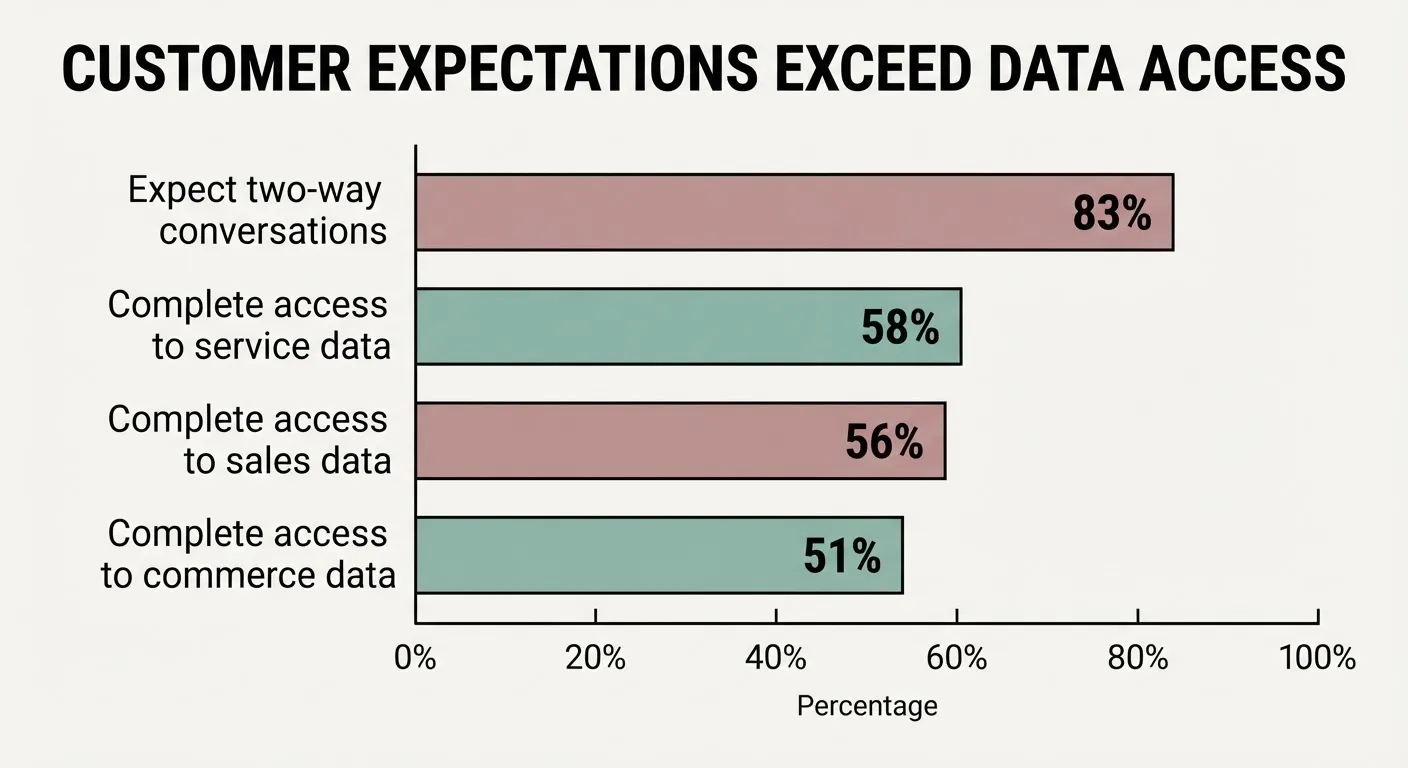
According to Salesforce’s State of Marketing 2026, more than eight in ten marketers (83%) say customers expect two-way conversations, but only 58% have complete service-data access, 56% sales-data access, and 51% commerce-data access. That is the operational bottleneck.
Start with the smallest useful set:
- Website pages the agent can crawl and summarize
- Content inventory with titles, URLs, owners, and status
- Topic map showing canonical themes and exclusions
- Publishing calendar with dates, formats, and priorities
- Approved metrics like clicks, rankings, and conversions
Then add controls the agent can follow:
- Mark current sources so stale pages do not win
- Define canonical pages for brand and product truth
- Limit fields to what marketing actually needs
- Respect consent and honor GDPR and CCPA requirements
- Provide opt-outs anywhere user data enters the loop
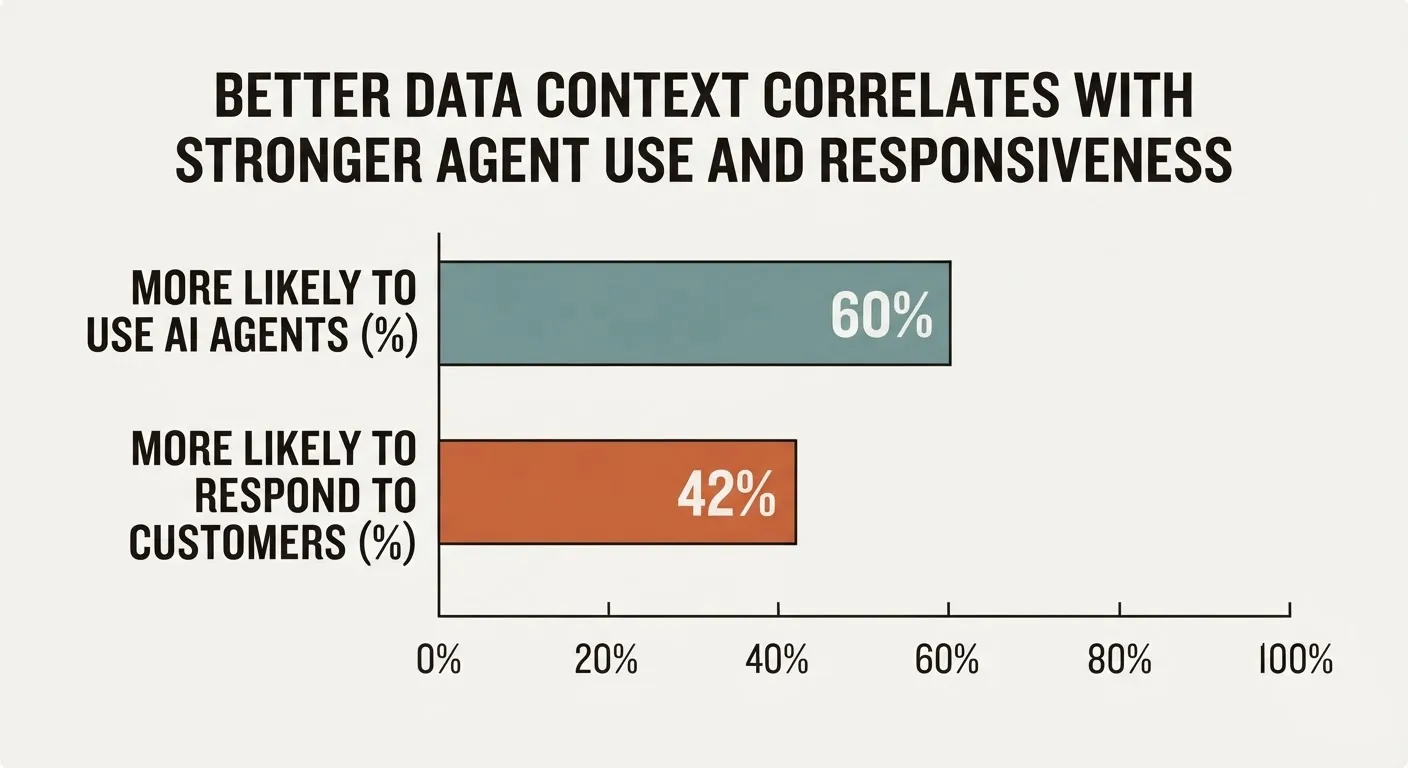
Salesforce also reports that marketers satisfied with data unification are 42% more likely to respond to customers effectively, which is a strong signal that clean context is not a nice-to-have.
Now you are ready for the actual connection.
Step 2: Model Context Protocol Implementation — Connect Claude, Cursor, or ChatGPT
 What is MCP in AI marketing?
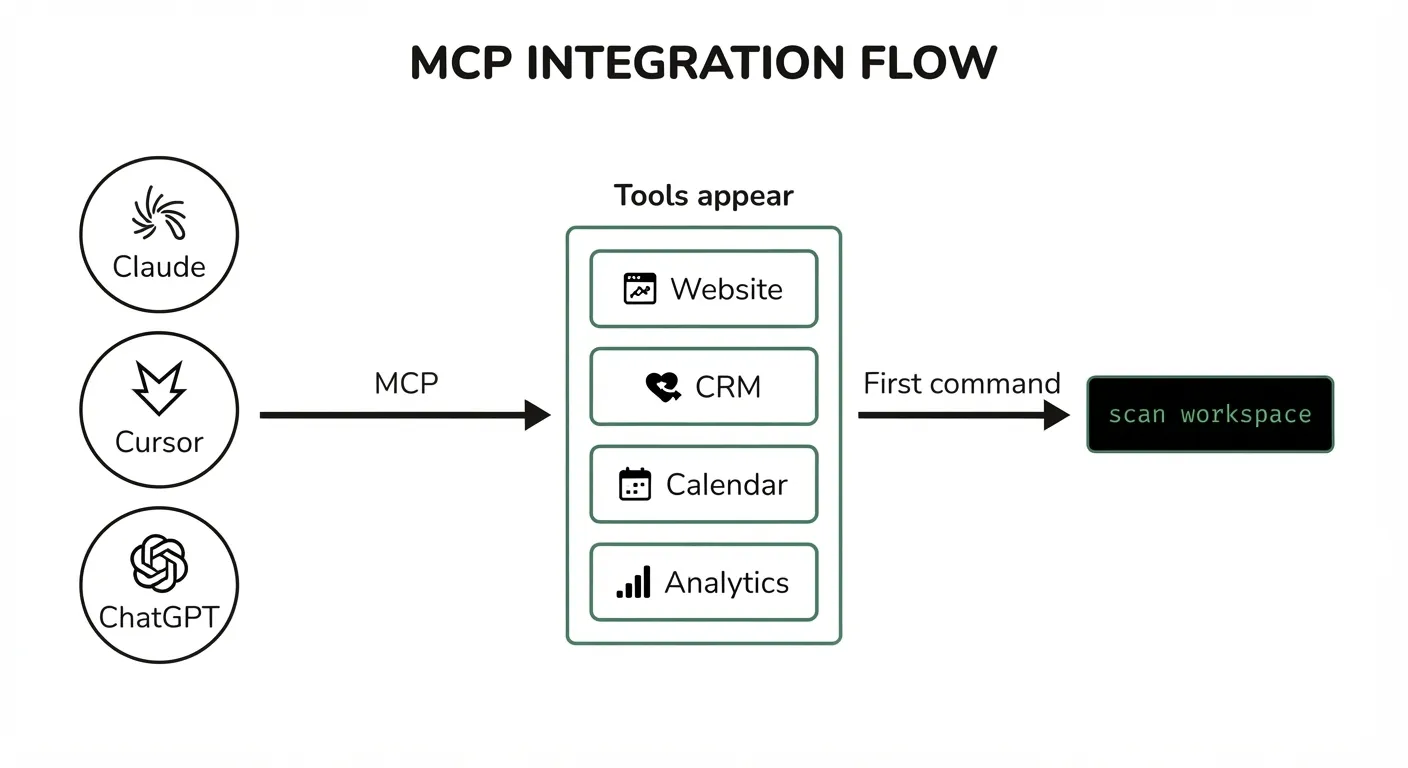
Model Context Protocol is the open-standard connection layer that lets an AI model securely reach approved tools and external data sources inside the session. In marketing, that means your agent can access a website scanner, page inventory, CRM fields, content calendar, or internal APIs without copying that context into every prompt.
If you want a practical Model Context Protocol implementation, this is the moment that matters.
Use the Scout7 one-line server connection in your MCP client:
- Claude Code: add the Scout7 MCP server, then start a new session
- Cursor: add the Scout7 MCP endpoint in MCP settings, then refresh tools
- ChatGPT: connect the MCP server in supported tool settings, then reopen the chat
- Claude: use the Scout7 MCP connection so approved tools appear in-session
The brand promise is simple: one-line integration with Claude, Codex, Cursor, and ChatGPT via MCP.
After connection, your agent should visibly expose tools like these:
- scan_site to crawl and index website pages
- list_pages to return core URLs and page metadata
- get_page_content to pull page copy for analysis
- content_inventory to review published assets
- calendar_read to inspect planned publishing slots
- performance_read to fetch approved marketing fields
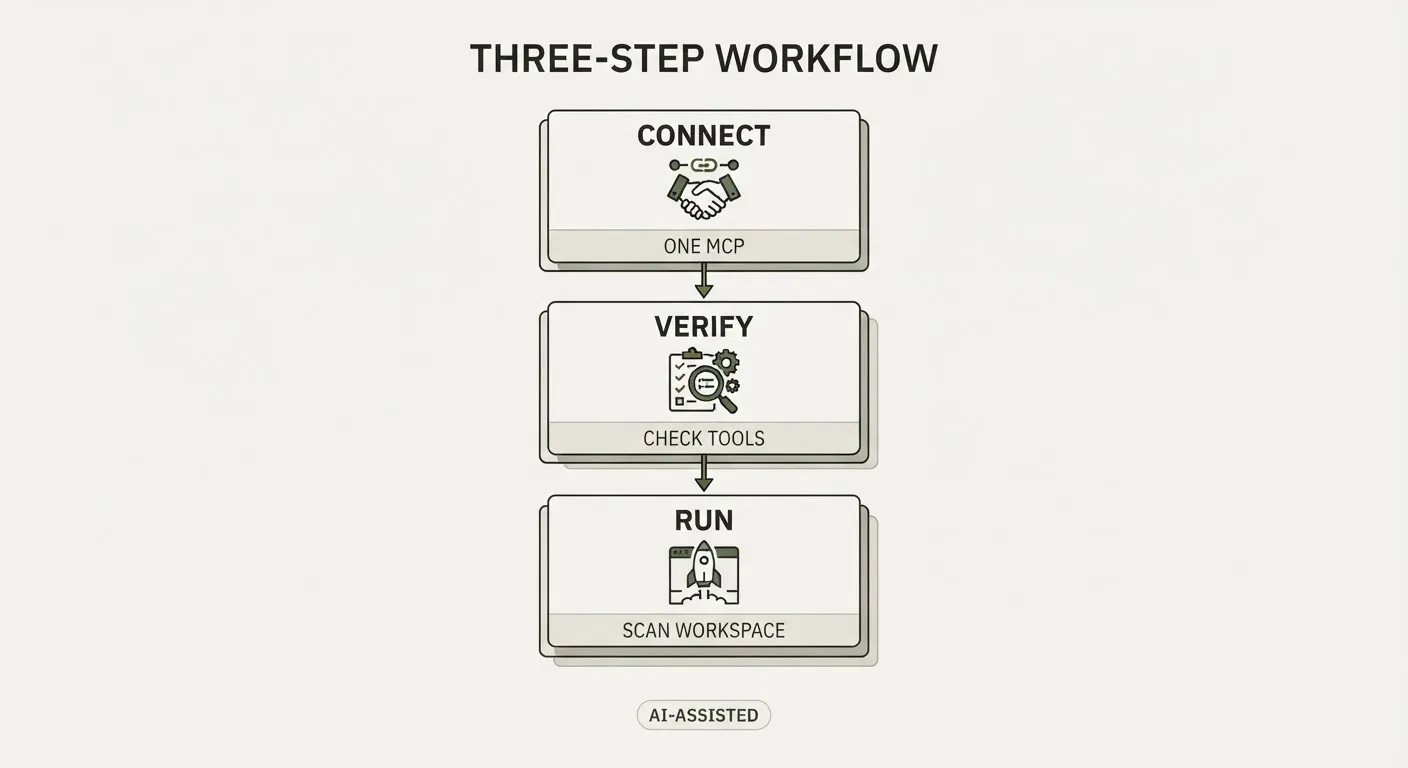
If those tools do not appear, the agent is still writing in the dark.
Run this first command immediately:
Scan our website, list core pages, identify canonical product and brand pages, and summarize current content gaps for organic growth.
That command works because it asks for observation before generation.
According to Salesforce’s State of Marketing 2026, teams satisfied with unified data are 60% more likely to use AI agents effectively, which is why this connection step is the real unlock for AI agentic marketing workflows.
Once the agent can see, the next job is giving it a repeatable loop.
Step 3: Build the automated loop
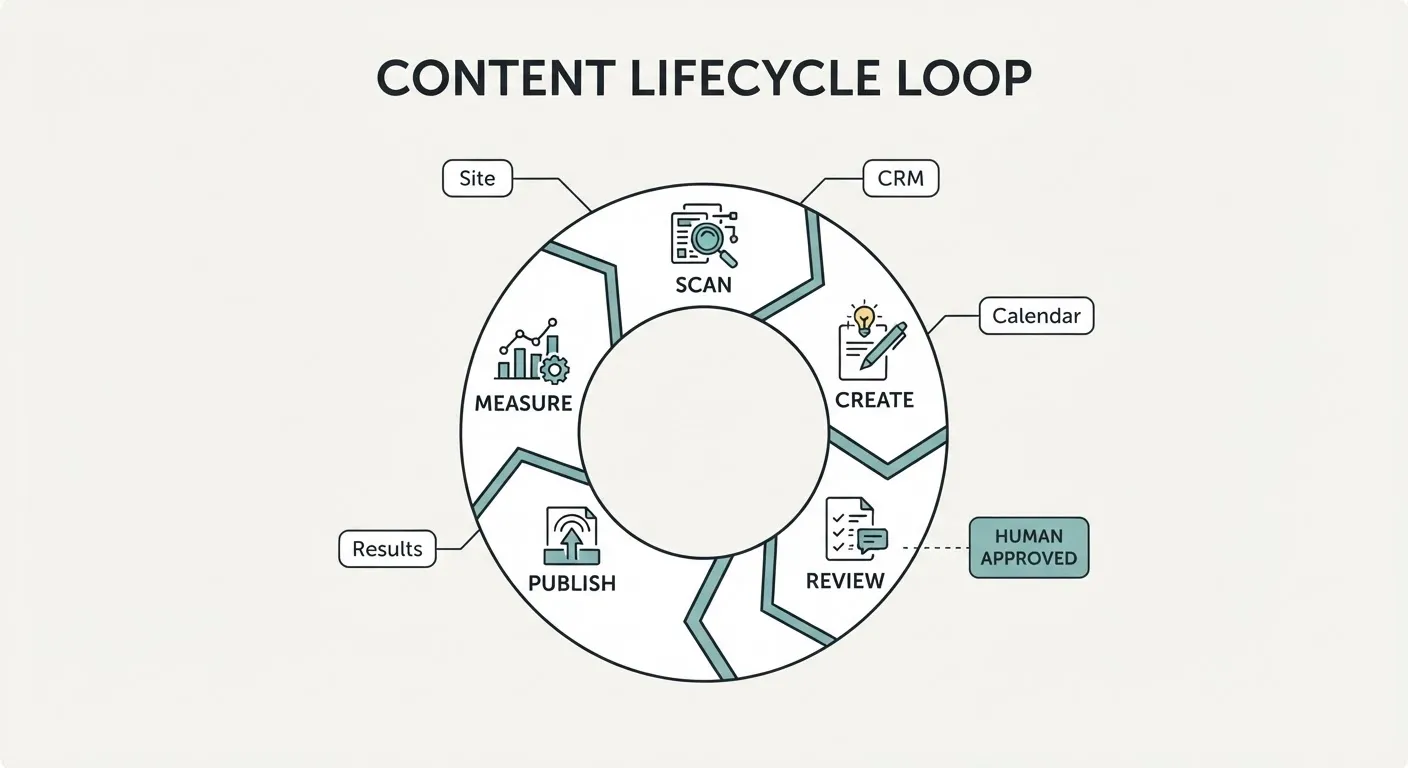 A useful agent does not just generate once.
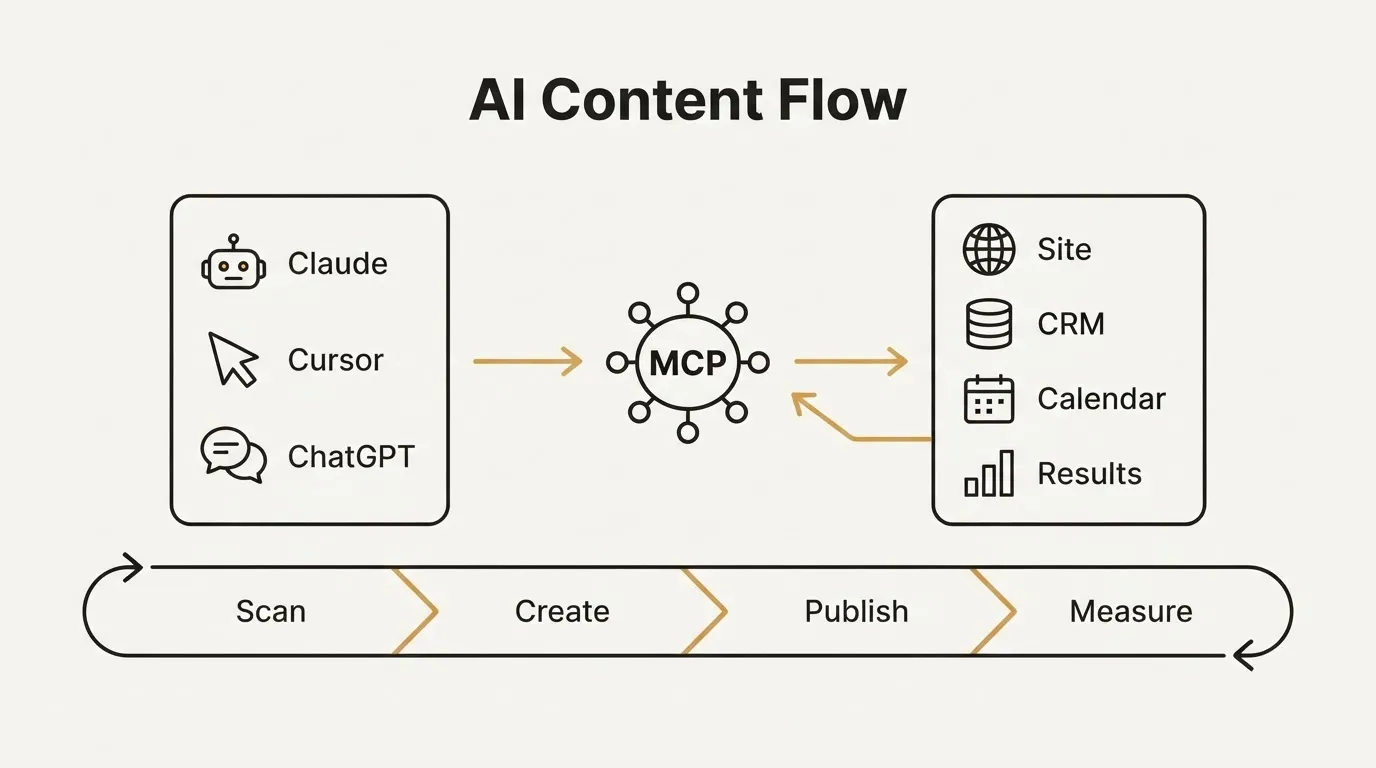
It runs a loop: detect change, create from live context, publish with review, then measure and feed results back into the next cycle. That is the core of an autonomous marketing growth loop.
For founders, this is where AI agent marketing automation becomes operational instead of impressive.
Use triggers your business already creates:
- New page published on the website
- Product update shipped by the team
- Sales notes changed in approved CRM fields
- Campaign results updated in reporting tools
- Calendar slot opened for a new asset
Pair that with guardrails:
- Require human approval before publishing
- Disclose AI assistance with clear labels
- Avoid guaranteed outcomes because results may vary
- Protect copyrighted material and attribute where needed
- Use only consented data with clear opt-outs
This matters because B2B journeys are fragmented.
According to McKinsey’s 2026 B2B growth research, buyers now use an average of ten channels during the journey, and market leaders are four times more likely to deploy true one-to-one personalization.
That is why MCP belongs inside marketing automation, agency marketing operations, and organic growth systems, not just content drafting.
Measure the impact of context-aware marketing
 The first proof of success is not volume.
It is whether the agent becomes more relevant, more current, and more responsive after the connection. That is the real goal of Context-Aware Marketing.
Track signals like these:
- Uses current pages instead of outdated copy
- Updates recommendations when site data changes
- Finds content gaps tied to real site structure
- Improves engagement on context-driven assets
- Surfaces backlink ideas from live topic coverage
This also changes how you think about cost.
Customer acquisition cost is the amount you spend to acquire a customer, and it matters because better organic execution can reduce dependence on paid ads over time. Organic growth matters here because context-aware agents can help teams publish more relevant assets from real signals, not generic briefs.
Salesforce’s State of Marketing 2026 reports that teams satisfied with unified data are 42% more likely to respond regularly to customers and 60% more likely to use AI agents. Those are not vanity metrics; they are signs that context plumbing improves execution quality.
And that makes the next move pretty clear.
Your next move
 The opening problem was simple: your agent was open, but blind.
The payoff is just as simple: one MCP connection can give it approved access to the workspace it needs to scan, reason, and draft from live business context instead of generic internet averages.
Key takeaways:
- MCP is practical: it connects agents to approved marketing tools
- Start narrow: website, inventory, calendar, and approved metrics
- Measure relevance: not draft count, but context-aware responsiveness
- Keep guardrails: human review, privacy, disclosure, and attribution
If you are asking, “How to implement Model Context Protocol for marketing?” the short answer is this: connect one agent to one permissioned workspace, confirm the exposed tools, and run a site-scan command before you ask it to write. If you are asking, “What is MCP in AI marketing?” it is the protocol layer that lets an AI model securely use your real marketing systems in-session.
That shift matters for founders, internal teams, and agency marketing operations alike because the market no longer rewards AI access alone.
It rewards execution quality, personalization, and responsiveness across fragmented channels.
Start with Scout7’s one-line connection, label resulting content clearly as AI-generated or Powered by Scout7 AI, and keep a human in the approval path.
Then read the Scout7 pages on Claude, AI Agent, MCP, and the autonomous marketing growth loop to extend the setup into a full scan-create-publish-measure system.
If your agent is connected before you close this tab, this article has done its job.
Frequently asked questions
What is a Model Context Protocol implementation in marketing?
A Model Context Protocol implementation is the setup that connects an AI agent to approved tools and live marketing data inside the session. In this article, that means giving Claude, Cursor, ChatGPT, or Claude Code access to things like a website scanner, page inventory, content calendar, and approved performance fields.
What should I connect first when setting up MCP?
Start with the smallest useful set: website pages, content inventory, a topic map, the publishing calendar, and approved metrics. The article recommends keeping the workspace narrow, readable, and safe before expanding access.
What is the first command I should run after connecting?
Run a site scan before asking the agent to write anything. The article’s recommended first command is: Scan our website, list core pages, identify canonical product and brand pages, and summarize current content gaps for organic growth.
Do I still need human review after the agent is connected?
Yes. The article recommends human approval before publishing, clear AI disclosure, and guardrails around privacy, attribution, and consented data. The goal is better execution from live context, not unattended publishing.